What it is
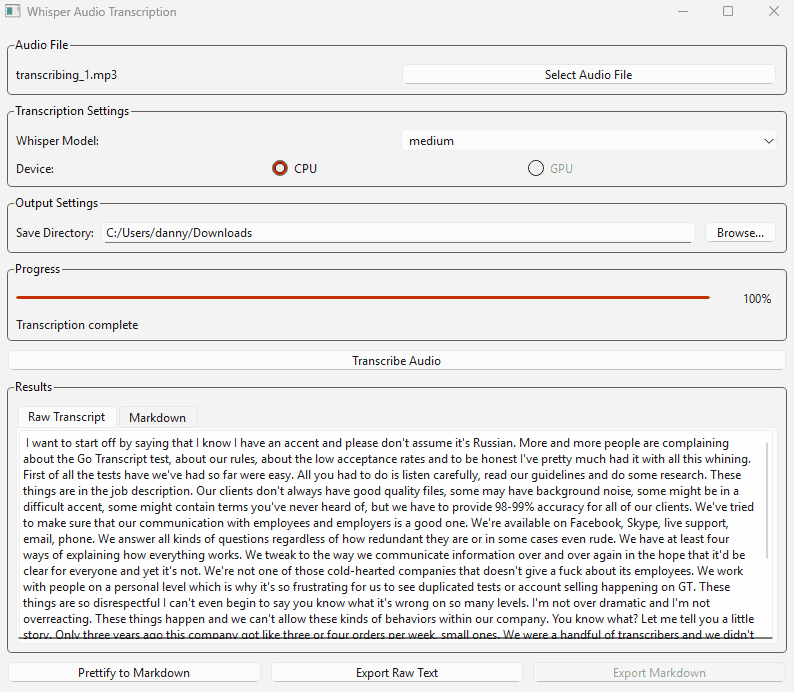
A desktop application that runs OpenAI's Whisper speech recognition model locally on Windows. Users select an audio file, choose a Whisper model size and CPU/GPU device, and get a transcript back, with no API call, no upload, no recurring cost.
Why I built it
I wanted high-quality transcription for personal use without sending audio to a paid API. Running Whisper locally is a solved problem at the command line, but the friction is non-trivial: model downloads, CUDA setup, CLI invocation. I built the GUI so the friction was a single click for me and anyone I shared the binary with.
How it works
- Frontend: PyQt6 GUI: file picker, model selector (tiny / base / small / medium / large), CPU/GPU toggle, progress indicator
- Backend: OpenAI Whisper running locally via PyTorch, CUDA acceleration when available
- Output: raw transcript view, optional Markdown conversion with live preview, export to
.txtor.md - Distribution: PyInstaller bundles Python + Whisper + PyTorch into a single Windows executable that can run on any Windows machine without Python installed
What I learned
- Packaging Python desktop apps with native dependencies is its own discipline. PyInstaller spec files, hidden imports, and the dance of getting CUDA libraries into the bundle.
- Larger Whisper models are worth it when you have a GPU. The accuracy lift on noisy audio is significant; the latency hit is acceptable when transcription isn't real-time.